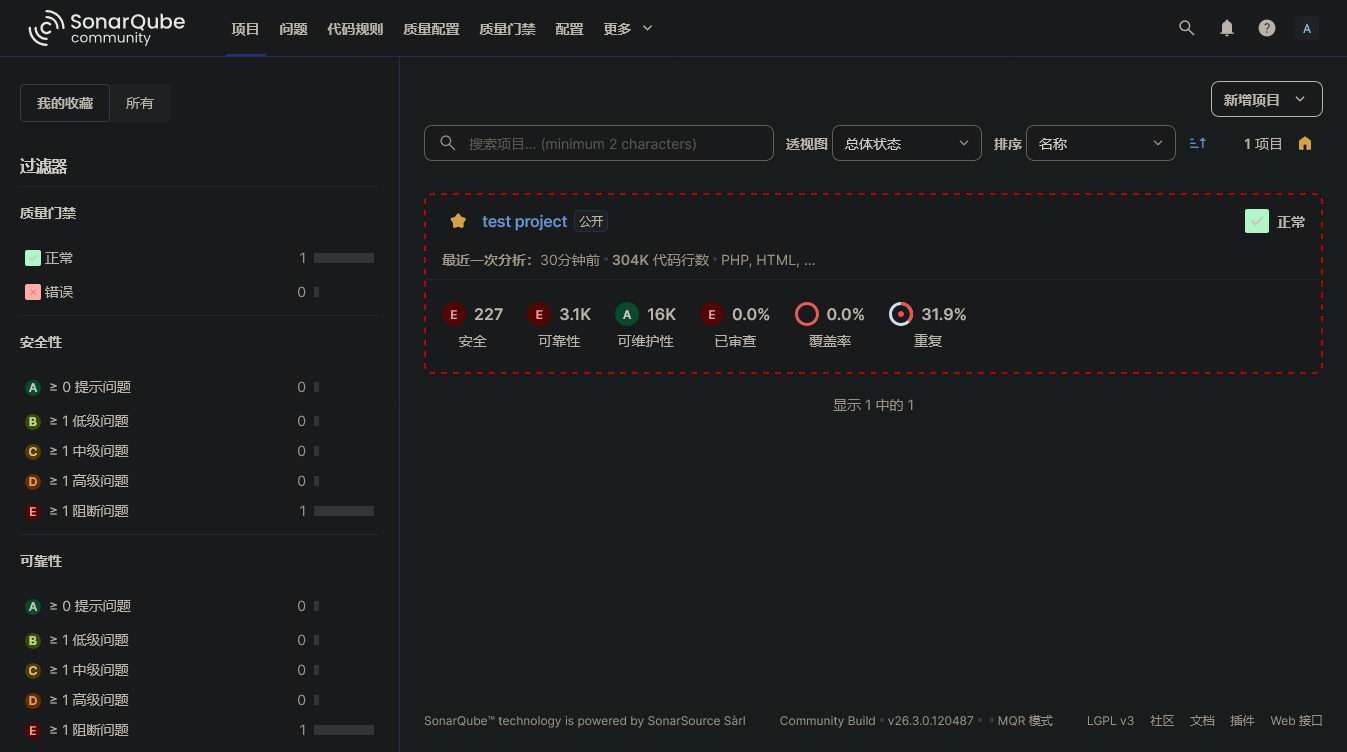
在软件开发过程中,代码质量是一个永恒的话题。随着项目规模的扩大和团队成员的增加,如何保证代码质量成为一个挑战。SonarQube 作为一款开源的代码质量管理平台,能够帮助团队在开发过程中持续检测代码质量问题,是 DevOps 和 CI/CD 流程中不可或缺的工具。
![SonarQube]()
什么是 SonarQube
SonarQube 是一个开源的代码质量管理平台,用于管理源代码的质量。它支持多种编程语言,包括 Java、C#、JavaScript、TypeScript、Python、PHP、Go 等 29+ 种语言。
SonarQube 通过静态代码分析,从以下七个维度检测代码质量:
- 可靠性 - 检测 Bug 和潜在的错误
- 安全性 - 发现安全漏洞和安全隐患
- 可维护性 - 检测代码异味(Code Smells)
- 覆盖率 - 单元测试覆盖率分析
- 重复度 - 检测重复代码块
- 复杂度 - 分析代码复杂度
- 文档 - 检查代码注释情况
SonarQube 架构
SonarQube 主要由以下几个组件组成:
1
2
3
4
| ┌─────────────────┐ ┌─────────────────┐ ┌─────────────────┐
│ Scanner │ ───► │ SonarQube │ ───► │ Database │
│ (代码扫描器) │ │ Server │ │ (数据库) │
└─────────────────┘ └─────────────────┘ └─────────────────┘
|
- Scanner:代码扫描器,负责分析源代码并将结果发送到 SonarQube Server
- Server:SonarQube 服务器,负责处理分析结果、生成报告、提供 Web 界面
- Database:存储配置信息、项目快照、分析结果等数据
安装部署
使用 Docker 快速部署
最简单的方式是使用 Docker Compose 部署 SonarQube:
1
2
3
4
5
6
7
8
9
10
11
12
13
14
15
16
17
18
19
20
21
22
23
24
25
26
27
28
29
30
31
32
33
34
| version: "3"
services:
sonarqube:
image: sonarqube:community
depends_on:
- db
environment:
SONAR_JDBC_URL: jdbc:postgresql://db:5432/sonar
SONAR_JDBC_USERNAME: sonar
SONAR_JDBC_PASSWORD: sonar
volumes:
- sonarqube_data:/opt/sonarqube/data
- sonarqube_extensions:/opt/sonarqube/extensions
- sonarqube_logs:/opt/sonarqube/logs
ports:
- "9000:9000"
db:
image: postgres:15-alpine
environment:
POSTGRES_USER: sonar
POSTGRES_PASSWORD: sonar
POSTGRES_DB: sonar
volumes:
- postgresql:/var/lib/postgresql
- postgresql_data:/var/lib/postgresql/data
volumes:
sonarqube_data:
sonarqube_extensions:
sonarqube_logs:
postgresql:
postgresql_data:
|
启动服务:
访问 http://localhost:9000 即可打开 SonarQube Web 界面,默认账号密码为 admin/admin。
系统要求
SonarQube 对系统有一定要求,特别是 Elasticsearch 组件:
1
2
3
4
5
| # Linux 系统需要设置以下参数
$ sysctl -w vm.max_map_count=262144
$ sysctl -w fs.file-max=65536
$ ulimit -n 65536
$ ulimit -u 4096
|
可以将这些配置写入 /etc/sysctl.conf 文件使其永久生效。
代码扫描
安装 Scanner
SonarQube 提供了多种 Scanner 工具:
- SonarScanner CLI - 通用命令行扫描器
- SonarScanner for Maven - Maven 项目专用
- SonarScanner for Gradle - Gradle 项目专用
- SonarScanner for .NET - .NET 项目专用
安装 SonarScanner CLI
1
2
3
4
5
6
7
| # 下载并解压
$ wget https://binaries.sonarsource.com/Distribution/sonar-scanner-cli/sonar-scanner-cli-5.0.1.3006-linux.zip
$ unzip sonar-scanner-cli-5.0.1.3006-linux.zip
$ mv sonar-scanner-5.0.1.3006-linux /opt/sonar-scanner
# 配置环境变量
$ export PATH=$PATH:/opt/sonar-scanner/bin
|
创建配置文件
在项目根目录创建 sonar-project.properties 文件:
1
2
3
4
5
6
7
8
9
10
11
12
13
14
15
16
17
|
sonar.projectKey=my-project
sonar.projectName=My Project
sonar.projectVersion=1.0
sonar.sources=src
sonar.tests=tests
sonar.language=php
sonar.exclusions=**/vendor/**,**/node_modules/**,**/tests/**
sonar.sourceEncoding=UTF-8
|
执行扫描
1
2
3
4
5
| # 登录 SonarQube 创建项目并获取 token
# 然后执行扫描
$ sonar-scanner \
-Dsonar.host.url=http://localhost:9000 \
-Dsonar.login=your_token_here
|
Maven 项目扫描
对于 Maven 项目,可以直接使用插件:
1
2
3
4
5
| <plugin>
<groupId>org.sonarsource.scanner.maven</groupId>
<artifactId>sonar-maven-plugin</artifactId>
<version>3.10.0.2594</version>
</plugin>
|
执行扫描:
1
2
3
| $ mvn clean verify sonar:sonar \
-Dsonar.host.url=http://localhost:9000 \
-Dsonar.login=your_token_here
|
质量门禁
质量门禁(Quality Gate)是 SonarQube 的核心功能之一,用于定义代码质量的标准。只有通过质量门禁的代码才能被合并或部署。
默认质量门禁
SonarQube 提供了默认的质量门禁标准:
| 指标 |
条件 |
| 新代码覆盖率 |
>= 80% |
| 新代码重复度 |
<= 3% |
| 新代码中的 Bug |
= 0 |
| 新代码中的漏洞 |
= 0 |
| 新代码中的代码异味 |
= 0 |
自定义质量门禁
可以根据项目实际情况自定义质量门禁:
- 进入「Quality Gates」页面
- 点击「Create」创建新的质量门禁
- 添加条件,如:
- Coverage < 50%
- Duplicated Lines (%) > 5%
- Maintainability Rating != A
- 将质量门禁设置为项目默认
代码规则与配置
SonarQube 内置了大量代码规则,涵盖多个方面:
规则类型
- Bug - 可能导致程序错误的代码
- Vulnerability - 安全漏洞
- Code Smell - 代码异味,影响可维护性
- Security Hotspot - 需要人工审查的安全敏感代码
质量配置
质量配置(Quality Profile)是规则的集合。可以:
- 继承内置配置并修改
- 激活或停用特定规则
- 调整规则严重级别(Blocker、Critical、Major、Minor、Info)
- 排除特定规则
1
2
3
4
| # 示例:排除特定规则
sonar.issue.ignore.multicriteria=e1
sonar.issue.ignore.multicriteria.e1.ruleKey=php:S1234
sonar.issue.ignore.multicriteria.e1.resourceKey=**/*.php
|
与 CI/CD 集成
Jenkins 集成
安装 SonarQube Scanner for Jenkins 插件:
1
2
3
4
5
6
7
8
9
10
11
12
13
14
15
16
17
18
19
20
21
22
|
pipeline {
agent any
stages {
stage('SonarQube Analysis') {
steps {
withSonarQubeEnv('My SonarQube Server') {
sh 'mvn clean verify sonar:sonar'
}
}
}
stage('Quality Gate') {
steps {
timeout(time: 5, unit: 'MINUTES') {
waitForQualityGate abortPipeline: true
}
}
}
}
}
|
GitLab CI/CD 集成
1
2
3
4
5
6
7
8
9
10
11
12
13
14
15
16
|
sonarqube-check:
image: maven:3.8.5-openjdk-17
variables:
SONAR_USER_HOME: "${CI_PROJECT_DIR}/.sonar"
GIT_DEPTH: "0"
cache:
key: "${CI_JOB_NAME}"
paths:
- .sonar/cache
script:
- mvn verify sonar:sonar -Dsonar.projectKey=${CI_PROJECT_NAME}
allow_failure: true
rules:
- if: $CI_PIPELINE_SOURCE == 'merge_request_event'
- if: $CI_COMMIT_BRANCH == 'main'
|
GitHub Actions 集成
1
2
3
4
5
6
7
8
9
10
11
12
13
14
15
16
17
18
19
20
21
22
|
name: SonarQube Scan
on:
push:
branches: [main]
pull_request:
types: [opened, synchronize, reopened]
jobs:
sonarqube:
name: SonarQube
runs-on: ubuntu-latest
steps:
- uses: actions/checkout@v4
with:
fetch-depth: 0
- name: SonarQube Scan
uses: SonarSource/sonarqube-scan-action@master
env:
SONAR_TOKEN: ${{ secrets.SONAR_TOKEN }}
SONAR_HOST_URL: ${{ secrets.SONAR_HOST_URL }}
|
分支分析与 PR 装饰
分支分析
SonarQube Community 版本支持主分支分析,Developer 版本及以上支持多分支分析:
1
2
3
| $ sonar-scanner \
-Dsonar.branch.name=feature-123 \
-Dsonar.branch.target=main
|
PR 装饰
Pull Request 装饰功能可以在 PR 中直接显示代码质量问题:
1
2
3
4
5
| $ sonar-scanner \
-Dsonar.pullrequest.key=123 \
-Dsonar.pullrequest.branch=feature-123 \
-Dsonar.pullrequest.base=main \
-Dsonar.pullrequest.github.repository=myorg/myrepo
|
常用 API
SonarQube 提供了丰富的 REST API:
1
2
3
4
5
6
7
8
9
10
11
| # 获取项目列表
$ curl -u token: http://localhost:9000/api/projects/search
# 获取项目质量门禁状态
$ curl -u token: http://localhost:9000/api/qualitygates/project_status?projectKey=my-project
# 获取问题列表
$ curl -u token: "http://localhost:9000/api/issues/search?componentKeys=my-project"
# 获取度量数据
$ curl -u token: "http://localhost:9000/api/measures/component?component=my-project&metricKeys=ncloc,coverage,bugs,vulnerabilities,code_smells"
|
最佳实践
1. 聚焦新代码
SonarQube 的「New Code」功能帮助你聚焦于新增和修改的代码,避免被历史债务淹没:
1
2
|
sonar.newCode.referenceBranch=main
|
2. 设置合理的质量门禁
不要过于激进,根据项目实际情况设置可达成的目标,逐步提升标准。
3. 定期清理技术债务
定期查看技术债务报告,安排时间修复高优先级问题。
4. 排除生成代码
自动生成的代码通常不需要扫描:
1
| sonar.exclusions=**/generated/**,**/*_generated.php
|
5. 使用增量分析
对于大型项目,启用增量分析可以加快扫描速度:
1
| sonar.analysis.cache.enabled=true
|
常见问题
1. 内存不足
如果扫描过程中出现内存不足错误,可以增加 Scanner 的内存:
1
| $ export SONAR_SCANNER_OPTS="-Xmx2048m"
|
2. 编码问题
确保项目使用 UTF-8 编码:
1
| sonar.sourceEncoding=UTF-8
|
3. 排除第三方代码
1
| sonar.exclusions=**/vendor/**,**/node_modules/**,**/dist/**
|
版本对比
| 功能 |
Community |
Developer |
Enterprise |
Data Center |
| 价格 |
免费 |
€150k/年 |
€250k/年 |
联系销售 |
| 语言支持 |
15+ |
29+ |
29+ |
29+ |
| 分支分析 |
主分支 |
多分支 |
多分支 |
多分支 |
| PR 装饰 |
否 |
是 |
是 |
是 |
| 安全报告 |
基础 |
完整 |
完整 |
完整 |
| 高可用 |
否 |
否 |
否 |
是 |